Kelly Rowland ringtonesP.O.D. ringtonesJohn Carpenter ringtonesJoe Nichols ringtones

Install Apache 2 and PHP 5 with MacPorts

PHP logo

4/2/08 - Added php.ini settings to use the proper MySQL socket at /tmp/mysql.sock.

3/23/08 - After going through these instructions on a new Leopard system, I made a few minor updates. The steps should now work for Leopard as well as Tiger.

While options abound, MacPorts may be the easiest option to configure a local web development environment on your Mac. I'll mention a few of the other options and then share the steps I've used to install Apache 2 and PHP 5 with MacPorts.

Here are a few of the options Mac users have to set up a PHP development environment:

  1. Use the stock Apache 1.3 with a PHP package, like the one from www.entropy.ch
  2. Install everything but the kitchen sink with MAMP or XAMPP
  3. Use MacPorts to install Apache 2 and PHP 5

If you haven't already done so, install MacPorts. If you're going to develop site's against a database, might I suggest installing MySQL.

LightTPD: An Alternative to Apache

I've read great things about LightTPD, a light-weight HTTP server. LightTPD does not consume the CPU cycles or memory that Apache does and looks like an efficient alternative. I hope to try LightTPD sometime but for now I'll stick with Apache simply because I'm comfortable configuring and administering it.

If you have MacPorts and your database of choice installed, let's get started.

Install Apache 2

Important: To avoid conflicts with the stock Apache installed on your Mac, turn off Personal Web Sharing under the Sharing System Preferences pane. It's easy to switch back and forth between stock- and MacPorts-Apache instances, but running both at the same time, without changing network port settings, will cause problems.

There aren't many port variants for Apache 2, and those that exist are probably not needed by most developers. The variants are:

  • +openldap - Provides LDAP authentication features.
  • +preforkmpm, +workermpm, +eventmpm - I grouped these together because they're related to server process management. Review Apache documentation on each if you're building a server to handle a lot of traffic.
  • +no_startupitem - Include this if you don't need to start Apache at system boot.

Install Apache 2 by issuing the following in a Terminal window (add variants, if desired):

sudo port install apache2

Here's the tail of my installation's output.

###########################################################
# A startup item has been generated that will aid in
# starting apache2 with launchd. It is disabled
# by default. Execute the following command to start it,
# and to cause it to launch at startup:
#
# sudo launchctl load -w /Library/LaunchDaemons/org.macports.apache2.plist
###########################################################
Warning: apache2 requests to install files outside the common directory structure!
--->  Installing apache2 2.2.6_0
--->  Activating apache2 2.2.6_0
--->  Cleaning apache2

Install PHP 5

MacPorts enables several key extensions by default, including curl, freetype, jpeg, libpng, libmcrypt, libxml2, libxslt, mhash, and tiff. In addition to these extensions you may add the following variants:

  • +apache2 or +apache (Apache 1.3) - We're installing the apache2 module
  • +fastcgi - Probably not needed for development servers
  • +imap - IMAP email functions
  • +tidy - HTML cleanup utilities
  • +mssql - MS SQL Server support
  • +snmp or +macports_snmp - Network monitoring and management
  • +mysql3 - You're not still!?
  • +mysql4 - Better :)
  • +mysql5 - Now we're talkin'!
  • +postgresql - Nice transactional database.
  • +sqlite - Nice light-weight database engine
  • +ipc - Building a site with high-performance demands?
  • +pcntl - Unix process control functions
  • +pear - PHP extension manager, a must have.

As some may already recognize, support for for Oracle, Sybase, dBase, and other less popular extensions is missing. Try searching the MacPorts list archives, I've seen discussions detailing the use of patches to add other extensions.

Before installing PHP, if you started Apache 2, be sure to stop it.
To install the latest version of PHP 5 (add desired variants):

sudo port install php5 +apache2 +mysql5 +pear

The tail of my PHP install was:

--->  Attempting to fetch php-5.2.4.tar.bz2 from <a href="http://www.php.net/distributions/<br />
--->" title="http://www.php.net/distributions/<br />
--->">http://www.php.net/distributions/<br />
---></a>  Verifying checksum(s) for php5
--->  Extracting php5
--->  Configuring php5
--->  Building php5 with target all
--->  Staging php5 into destroot
Warning: php5 requests to install files outside the common directory structure!
--->  Installing php5 5.2.4_1+apache2+darwin_8+macosx+mysql5+pear
 
If this is your first install, you might want
cd /opt/local/apache2/modules
/opt/local/apache2/bin/apxs -a -e -n "php5" libphp5.so
 
* copy  /opt/local/etc/php.ini-dist to  /opt/local/etc/php.ini
--->  Activating php5 5.2.4_1+apache2+darwin_8+macosx+mysql5+pear
--->  Cleaning php5

Create an Apache Configuration File

MacPorts installs a sample Apache configuration file. Make a copy of this file with:

sudo cp /opt/local/apache2/conf/httpd.conf.sample /opt/local/apache2/conf/httpd.conf

Activate the PHP 5 Module

After installation is complete, activate the newly installed PHP module as directed with:

cd /opt/local/apache2/modules
sudo /opt/local/apache2/bin/apxs -a -e -n "php5" libphp5.so
[activating module 'php5' in /opt/local/apache2/conf/httpd.conf]

Configure Apache and PHP 5

Set Apache's Document Root, Enable User Directories

Are you the only one using the server or are you collaborating with others?
If multiple developers need access, should each have their own sandbox or will the team develop in a single directory?
Are there existing pages and scripts in Apple's default Apache document root directory (/Library/WebServer/Documents) and do you want to continue developing in this directory? Your answers to these questions will determine which edits you'll make to your httpd.conf file.

Open /opt/local/apache2/conf/httpd.conf in your favorite text editor.

sudo pico /opt/local/apache2/conf/httpd.conf

If you want to change the default MacPorts Apache document root to Apple's, look for:

DocumentRoot "/opt/local/apache2/htdocs"

and change it to

DocumentRoot "/Library/WebServer/Documents"

If you changed the DocumentRoot, change the Directory directive

<Directory "/opt/local/apache2/htdocs">

to

<Directory "/Library/WebServer/Documents">

Add index.php to the dir_module directive:

<IfModule dir_module>
    DirectoryIndex index.html index.php
</IfModule>

Add a new mimetype so that Apache will direct files ending in .php to the PHP module for processing. Add the following within the <IfModule mime_module> block. Without this, all you'll see is the text of your PHP scripts

AddType application/x-httpd-php .php
AddType application/x-httpd-php-source .phps

And finally, to enable user directories, uncomment:

Include conf/extra/httpd-userdir.conf

Save and close the httpd.conf file.

Create a php.ini File

Create an INI file from which you can set error display, file upload settings, and other PHP options.

sudo cp /opt/local/etc/php.ini-dist /opt/local/etc/php.ini

If you've installed MySQL, tell PHP where it can find the MySQL socket. Set the following in the php.ini file:

mysql.default_socket = /tmp/mysql.sock

Starting and Stopping Apache

Adding aliases to your shell environment will make it easier to start and stop Apache. Edit your .profile or .bash_profile:

pico ~/.profile

Copy the following to add an alias to the apachectl binary. You can name the alias apache2ctl to avoid potential conflicts with the stock apachectl binary

alias apache2ctl='sudo /opt/local/apache2/bin/apachectl'

Reload your profile or bash_profile:

source ~/.profile

As noted previously in the Apache install output, you can configure Apache to start at system boot with:

sudo launchctl load -w /Library/LaunchDaemons/org.macports.apache2.plist

Try It!

Fire up Apache with:

apache2ctl start

Drop the following in a PHP file and save it your document root or user directory.

<?php
 
phpinfo();
 
?>

You should see something like the following in your browser.
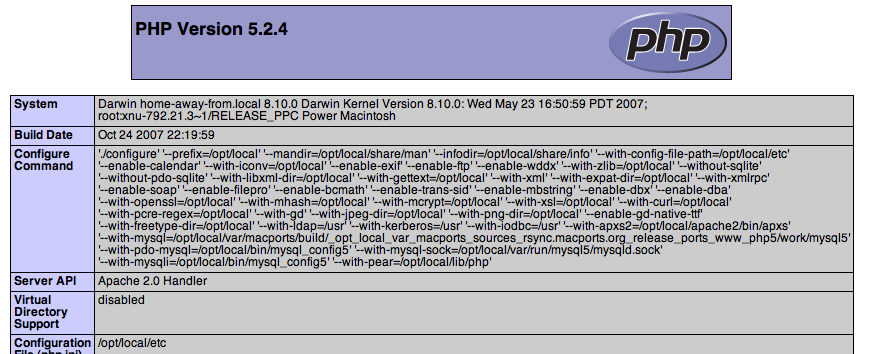
PHP Info display

Conclusion

You're all set to start writing PHP applications on your Mac. Take a look at the LightTPD link below if you're interested in an alternative, you should be able to substitute the Ruby steps with PHP.

Related Links

Comments

this worked great for us

If you have an existing php.ini, just copy it over. Also, you don't need to do +mysql if you already have mysql installed correctly.

no php for user pages

I followed all the steps in this page and I have everything up and running, but php doesn't work on the user directories. Can anyone shed some light?

What do you see when accessing user dirs?

What do you mean exactly? What messages do you see (not found, forbidden)? Is your directory path correct /Users/*/Sites? Is the UserDir set to Sites?

UserDir Sites
 
<Directory "/Users/*/Sites">
...

alternate php.ini

Hi, typically, i could place another php.ini file in, say my top level of my http server and those settings would override the first ones. This way I can change the doc_root from "/" to "/public" in the alternate php.ini.
With this installation of apache2, the alternate php.ini is not being loaded. Is there some other setting somewhere i need to change?

Great guide! Worked like a

Great guide! Worked like a charm. Thanks.

pulling hair out

I have tried to use mac ports to update to apache 2 mysql5 and Php5
Ok apache2 no problem.. tutorial on mysql from macports didn't work but i got it up from source

ok final step PhP5.. this article seemed like the promise land but I get

httpd: Syntax error on line 115 of /opt/local/apache2/conf/httpd.conf: Cannot load /opt/local/apache2/modules/libphp5.so into server: Library not loaded: /opt/local/lib/mysql5/mysql/libmysqlclient.15.dylib\n Referenced from: /opt/local/apache2/modules/libphp5.so\n Reason: image not found

any ideas?

Got it from source?

What do you mean "i got it up from source"? Did you install the MacPorts version, from source, or some other binary distribution? The error seems to indicate that PHP is looking for MySQL dependencies in the standard Macports location and they're not there.

Ok got it now

I had a virtual hosts setup before I installed, so i forgot to reconfigure the httpd.conf for that. It's all working now. Awesome tutorial! thanks!

Pesky vhosts :)

Way to go.

mmmm almost

well, i followed all the instructions, and when I open my info.php page, the browser wants to download the file instead of parsing it. It's like the mime types are'nt right. but I have

AddType application/x-httpd-php .php
AddType application/x-httpd-php-source .phps

any ideas? because this just hosed my whole server setup

can't get PHP to work

Thank you very much for the instructions. I am very new to shell and macports.
I followed all the instructions but when I tried the php info page all I could see in the browser window was the php code itself.
Where did I go wrong? Any ideas?
Many thanks
Giuseppe

Here are a few things to try

If you didn't see any errors during the install, make sure the stock Apache server is turned off. Turn of web sharing at System Preferences > Sharing. Then run 'apache2ctl start' again and try the info page again. Do you see any errors during the process?

can't get PHP to work

In the installation process I don't get any errors. The message I get when I do apache2ctl start is -bash: apache2ctl: command not found
I have created the alias in my ./profile in the home directory. Still no luck.
Thank you for your time
Giuseppe

Try the full path to apache2ctl when starting

/opt/local/apache2/bin/apache2ctl start

What a life saver!

Thank you so much for this awesome guide. I've spent many hours trying install Apache 2 and activate PHP 5 independently of each other and ran into so many errors. I don't know a whole lot about Shell commands and networking, so I'm in very foreign territory. Finally, though, I found this guide, removed my existing Apache 2 and PHP installations and started over using MacPorts and your instructions. Voila! It all works perfectly!

Thanks again!

That's great!

Happy to hear this was helpful!

still have the old version of php

Hello,

Thanks for the thorough instructions! I ran the following macports command, and continue to see my old PHP install when I run phpinfo() from /opt/local/apache2/htdocs:
port install php5 +apache2 +mysql5 +pear +imap +ipc +pcntl +sockets +tidy

I'm doing the install on Leopard 10.5.2.

Is there some extra tweaking necessary with php.ini or a virtual hosts file? I've noticed that "Web Sharing" under system preferences no longer seems to be related to the new Apache install.

All I've been trying to do is get the GD library to work (I was running Leopard's PHP and Apache with an install of MySQL5.), and your instructions had given me the most hope. However, I feel like I've tripped just short of the finish line. :)

-ilija

Sounds like the Apple stock PHP/Apache is running

You're correct, the Web Sharing control panel is only tied to the stock Apache/PHP. Are you absolutely sure that you're seeing phpinfo() in htdocs? Is there an equivalent script in the stock web root (/Library/WebServer/Documents)?

I just ordered a new MacBook. I'll finally have a Mactel and Leopard. I'll probably be setting it up for web development this weekend.

Many thanks!

I've tried at least 3 other times to get Apache, MySql, and PHP5 working on my MacBook, but all those attempts were unsuccessful. This set of instructions addressed all of my questions, and actually worked! Thank you so much for thoroughly documenting this process.

Tim

You're welcome :)

I was fortunate to have others do the same for me when I began working with Apache/PHP. Pay it forward!

Great instructions

I've done this many times before, but I always like to follow the directions. I had recently been playing around with MacPorts, and to my surprise this was the first hit! To the newbies out there (or those who can appreciate a graphical interface), I recommend using Porticus for MacPorts. It's much easier than remembering all the commands to use on the command line.

Thanks Alex. Now if I could

Thanks Alex. Now if I could just keep to a more regular posting schedule!

Problem following your instructions

I followed the instructions above, and installed php5 +apache2

however when i run apache and view my php application ( even the phpinfo page )

I see the following error appearing in apaches error_log:

httpd(728) malloc: *** error for object 0x6870655a: Non-aligned pointer being freed
*** set a breakpoint in malloc_error_break to debug

This appears repeatedly for ever resource that is requested.

Has anyone else experienced this?
the application still works, and the pages still display as normal I just want to figure out how to get rid of this error.

Would be grateful for any help, anyone can provide.

Many thanks
Nadeem

Haven't seen that error

What does Google say?

bdb44

This didn't work for me on Leopard-
sudo port install +darwin_8 +universal

I got it working with:
sudo port install apr-util +no_bdb
sudo port install apache2

Thank you!!!

It work's perfect. I just haven't understand if the code:
sudo port install php5 +apache2 +mysql5 +pear
install also mysql, or if i had to install it from the site mysql.com.

Yes,

Yes, +mysql5 should have also installed the MySQL database server. See my article on how to configure MySQL.

Thank you very much for your

Thank you very much for your answer. Unfortunately, the link you propose tells me: "acces denied". I try to create an account... and see...

Sorry for the delayed reply.

Sorry for the delayed reply. I believe the problem has been fixed.

I've created an account,

I've created an account, but: "You are not authorized to access this page". :(

Post new comment

The content of this field is kept private and will not be shown publicly.
  • Web page addresses and e-mail addresses turn into links automatically.
  • Allowed HTML tags: <a> <em> <strong> <cite> <code> <ul> <ol> <li> <dl> <dt> <dd> <codeblock> <blockquote> <h1> <h2> <h3> <h4> <h5> <img>
  • Lines and paragraphs break automatically.
  • You can enable syntax highlighting of source code with the following tags: <code>, <blockcode>. PHP source code can also be enclosed in <?php ... ?> or <% ... %>.
  • Use the special tag [adsense:format:group:channel] or [adsense:flexiblock:location] to display Google AdSense ads.

More information about formatting options

CAPTCHA
This question is for testing whether you are a human visitor and to prevent automated spam submissions.